
Summary and Setup
Introduction
This workshop introduces practical tools and workflows for working with large n-dimensional scientific datasets used in oceanography, climate, and meteorology in a cloud-friendly way.
You’ll learn to:
- Migrate environmental data from traditional formats such as NetCDF to cloud-native formats like Zarr and VirtualiZarr
- Store, process, and access multi-terabyte datasets efficiently using object storage and parallel processing tools such as Dask
- Build scalable and reproducible cloud-native workflows for environmental data
- Visualise and explore large datasets efficiently in the cloud
The aim is to help you understand not only how these tools work, but also why they are useful for analysing, sharing, and managing environmental data more efficiently.
What data do you work with?
Before we start, take a moment to think about your own experience with environmental data. This short activity will help us understand the kinds of datasets and challenges you bring to the workshop.
- In the shared notes document (CodiMD), write one sentence about the data you usually work with and roughly how large it is.
- Describe one challenge you have faced when working with data that is too large for your computer or too slow to process.
- List one tool, library, or computing system you have used to help with analysis, storage, or data access.
In this workshop, we will use:
jupyterlabnumpynetCDF4xarrayzarrdask-
fsspec,s3fs,boto3, andobstorefor cloud storage access -
matplotlibandcartopyfor plotting -
icechunkfor versioning -
virtualizarrfor virtual Zarr stores -
stacfor cataloging -
topozarrfor generating multiscale Zarr - others…
The exact environment is provided in the course repository as an environment.yml file for creating a conda environment.
Jargon busting
Here are some of the main terms that appear throughout the workshop.
CPU, core, process, and thread
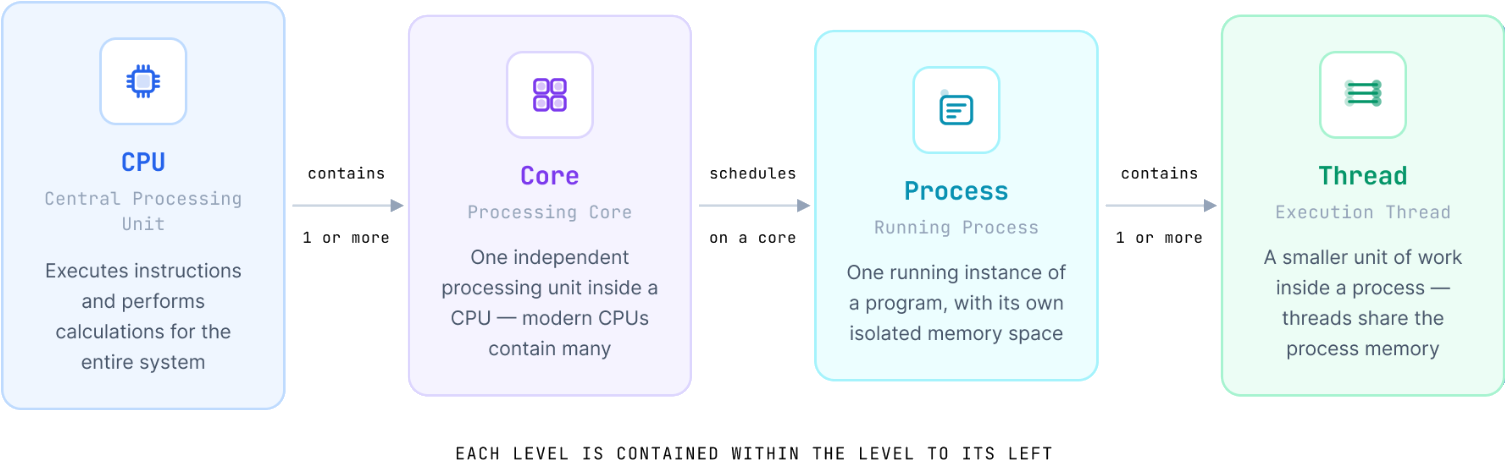
The CPU is the Central Processing Unit that executes instructions and performs calculations. A core is one processing unit inside a CPU, while a process is one running instance of a program and a thread is a smaller unit of work inside that process.
Parallel processing and Dask
Parallel processing means splitting work so that different parts run at the same time, often across cores, processes, or workers. Dask is a Python library that facilitates parallel computing by breaking down large computations into smaller tasks that can be executed concurrently.
RAM and storage
RAM is the computer’s short-term memory. Storage is where data live more permanently, such as on disk, SSDs, shared storage, or object storage.
Cluster, node, and HPC
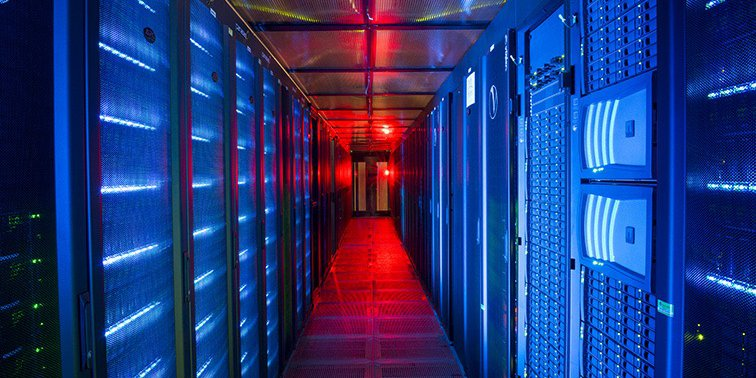
A cluster is a group of connected computers that work together, and a node is one computer within that cluster. High-performance computing (HPC) refers to large shared systems designed for heavy computation and large data processing.
JASMIN and SSH
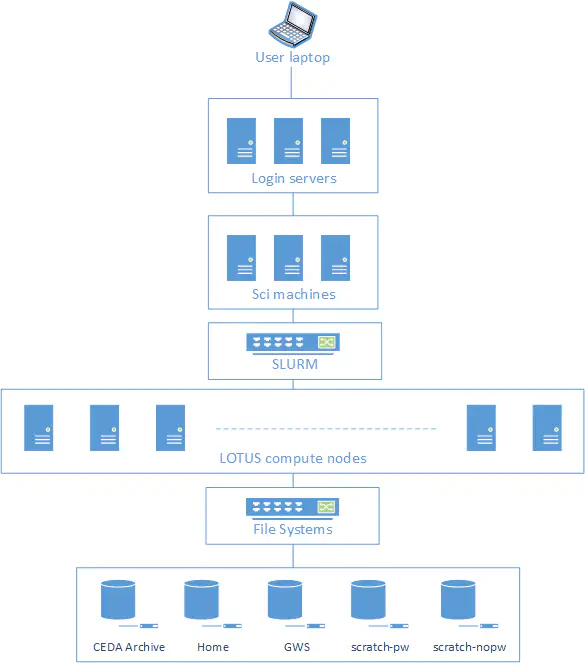
JASMIN is the UK’s data analysis facility for data-intensive environmental science. It provides notebook services, shared storage, and computing resources for environmental data work. SSH (Secure Shell) is a secure way to connect to a remote computer over a network.
Group workspace
A group workspace is shared storage on JASMIN for collaborative work and course data.
Jupyter notebook, and kernel
A Jupyter notebook is a browser-based environment for running code, text, and plots together. A kernel is the Python environment that runs notebook code.
Environment.yml and conda/mamba
An environment.yml file is used to define a Conda environment, specifying the Python version and the packages required. Conda and mamba are tools for managing these environments and installing packages.
Dataset, array, coordinate, and data variable
A dataset is a collection of related scientific data and metadata in different formats. An array is a multi-dimensional grid of values, while a coordinate is a named axis such as time, latitude, longitude, or depth. A data variable is the main measured or modelled value, such as temperature or salinity.
Metadata and controlled vocabulary
Metadata is information about the data, such as units, long names, chunk sizes, and coordinate definitions. A controlled vocabulary is a curated list of standard terms and identifiers used to avoid ambiguity in metadata.
Zarr, Xarray, chunk, and lazy loading
Zarr is a chunked data format for large N-dimensional arrays. Xarray is a labelled array library for working with multidimensional scientific data. A chunk is a smaller piece of a larger array, and lazy loading means data are not fully read into memory when a dataset is opened; they are loaded only when needed.
Object storage and bucket
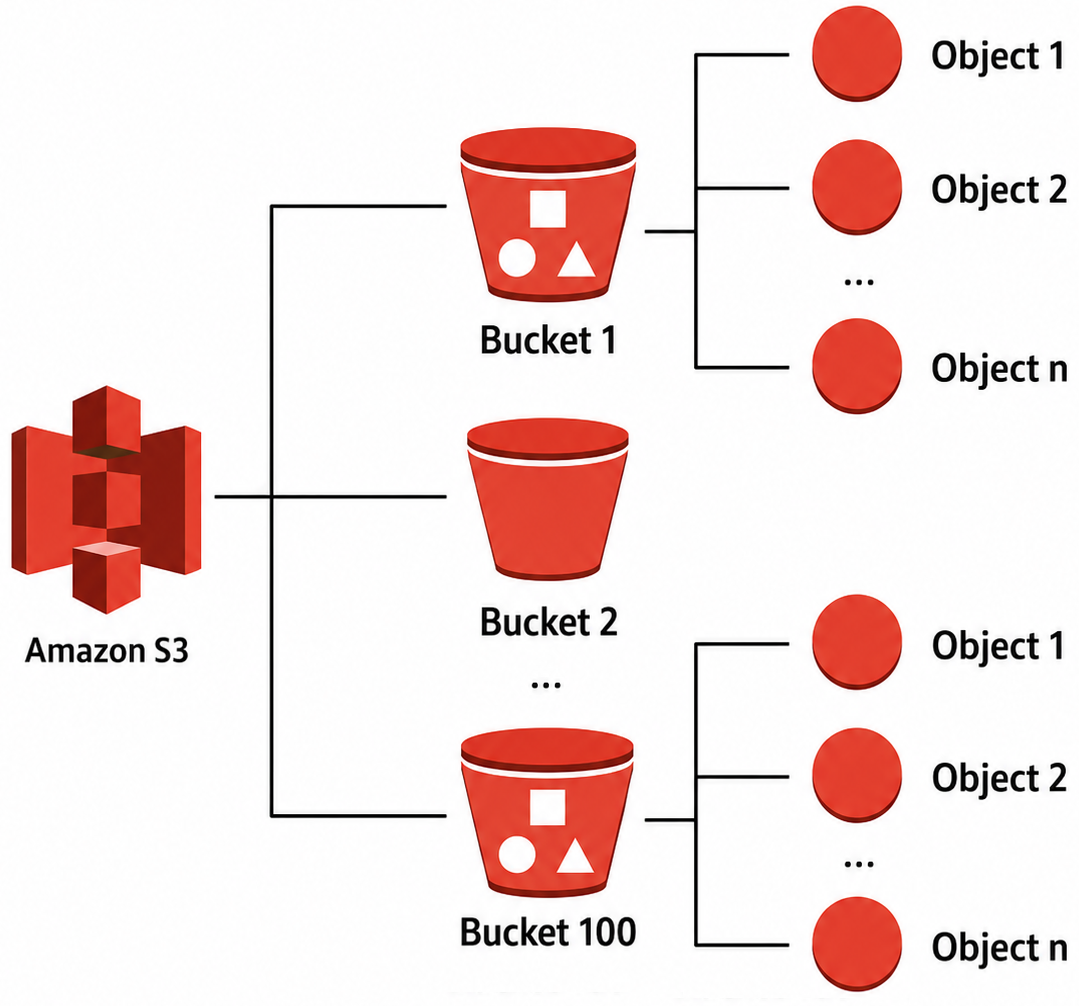
Object storage keeps data as independent objects in a storage system, often accessed through APIs such as S3. A bucket is a top-level container for objects in object storage.
POSIX and Object-Store file system
A POSIX file system is a traditional file-system model with directories, files, and paths that are accessed through a local or mounted storage interface. It is commonly used for shared filesystems and local disks.
An object-store file system is a storage interface that exposes object storage through filesystem-like operations, often used in cloud workflows. It is different from a traditional POSIX filesystem because data are accessed through object APIs rather than a normal directory tree.
Cloud-native format
A cloud-native format is designed to work efficiently with object storage and remote access patterns, often by allowing partial reads and parallel access.
Setup
Before starting this workshop, complete the preparation guide available in the Setup Instructions. This guide contains everything you need to get ready for the course, including instructions for both in-person and remote participants.
The setup guide covers:
- Installing the required software.
- Downloading the example datasets used throughout the workshop.
- Verifying that your environment is correctly configured.
In addition to the technical setup, the guide includes prerequisite material to help you prepare for this course. It consists of three introductory episodes:
- Shell basics for navigating files, editing text, and using help tools.
- Introductory
xarrayworkflows for opening, slicing, plotting, and processing NetCDF data. - Git foundations for tracking changes, branching, and merging.
Completing the setup guide ensures that all participants begin the
workshop with a working environment and a shared foundation in the
command line, xarray, and Git workflows.
About the example data
This workshop uses example ocean and atmospheric datasets in NetCDF, GRIB, and Zarr formats to demonstrate different approaches for storing and accessing scientific data.
The datasets are derived from widely used public products, including:
ERA5 hourly data on single levels from the Copernicus Climate Data Store (ECMWF). ERA5 is the fifth-generation global atmospheric reanalysis, providing hourly estimates of atmospheric, land-surface, and ocean-wave variables from 1940 to the present. It combines numerical weather prediction models with observations through data assimilation to produce a consistent, high-quality record for weather and climate applications. For this workshop, we use NetCDF, GRIB, and Zarr files containing the significant wave height (
swh) and sea surface temperature (sst) variables.GLORYS12V1 Ocean Reanalysis from the Copernicus Marine Service. GLORYS12V1 is a global, high-resolution ocean reanalysis based on the NEMO ocean model, combining numerical simulations with satellite and in situ observations through data assimilation to provide a consistent representation of the ocean state. For this workshop, we use NetCDF and Zarr files containing sea surface height (
ssh), potential temperature (thetao), salinity (so), and the zonal and meridional current velocity (uoandvo) variables.
These datasets provide realistic examples for exploring cloud-native geoscience workflows throughout the workshop.